DIY T-shirt Design: Art & AI
Neli CreativeArt & Design
4.621.00 Reviews
- Version
- 2.0.13
- Installs
- 500.00K
- Age Rating
- Everyone
Screenshots
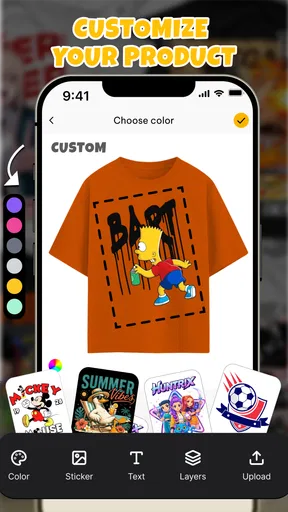
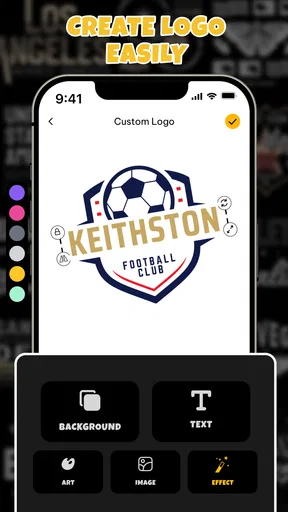
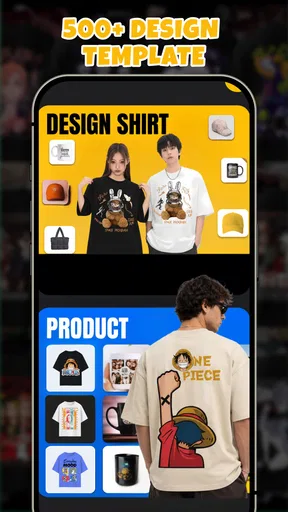
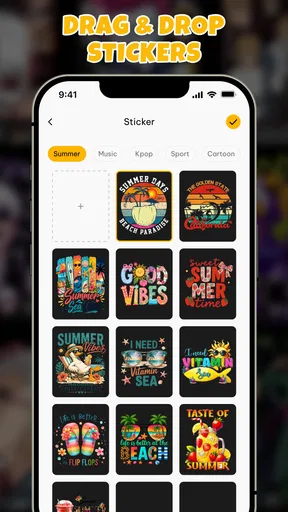
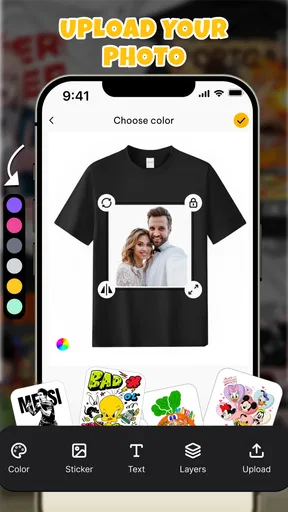
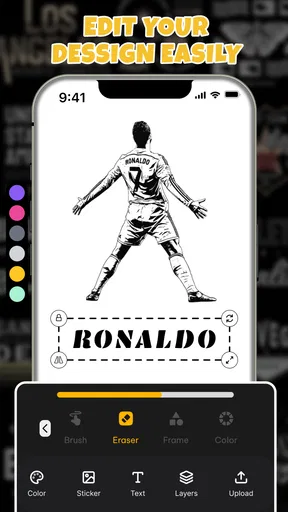
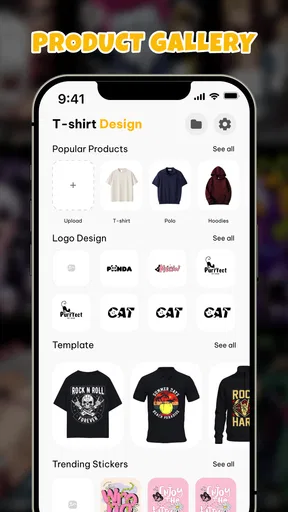
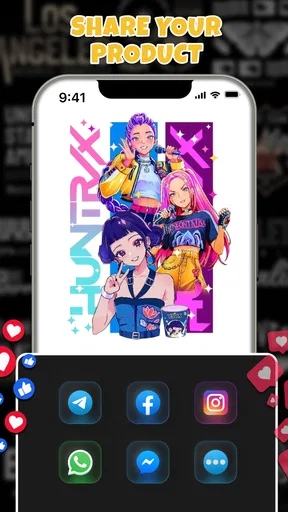
Our Review of DIY T-shirt Design: Art & AI
 Analysis by Appyee
I approached DIY T-shirt Design: Art & AI as the kind of app I would open when I had an idea for a shirt but no interest in learning a full design program. It sits in the Art & Design category and comes from Neli Creative, with a free entry point that makes experimenting easy. My first impression is that it is aimed at turning a rough visual idea into something personal without making the process feel like a desktop graphics project.
That focus matters. Designing a shirt is not quite the same as making an ordinary social post or editing a photograph. The artwork has to work on fabric, remain readable from a distance, and look intentional when placed on a shirt rather than floating on a blank screen. This app is most appealing when you want to explore concepts quickly, create something for yourself, or prepare a simple design for a small personal project.
How the current version feels in everyday use
The current release is version 2.0.13, and the app has already attracted over 500 thousand installs. Its average score is 4.6 from around 1.6 thousand ratings, which suggests that the basic idea connects with many users. I would not treat that score as a promise that every design will be perfect, but it does indicate that the app has found a practical audience beyond people who only want to test an AI novelty.
The main appeal is the short distance between an idea and a visual result. Instead of beginning with an empty professional canvas, I can think in terms of a shirt concept: a phrase, a mood, a graphic direction, or a theme. That makes the experience less intimidating for someone who knows what they want to wear but does not know how to build artwork from layers, masks, and vector paths.
I also like that the app is free and rated for Everyone. That combination makes it suitable for casual experimentation, family projects, school activities, and small creative sessions where nobody wants to commit money before understanding the workflow. Free access is particularly useful here because shirt design often involves several failed ideas before one feels worth keeping.
In a realistic everyday situation, I could use it before a weekend event. I might start with a simple concept for a group shirt, try a few visual directions, remove the ones that look too busy, and keep the design that still reads clearly when viewed as a small preview. The value is not only the final image; it is the speed of comparing ideas without turning each attempt into a major project.
Where the AI approach helps
The AI angle is most useful at the beginning of the process. When I have a vague idea such as a playful animal, a retro-looking emblem, or a bold hobby reference, generating or exploring visual directions can help me discover a style I would not have drawn from scratch. It works as a source of momentum: instead of staring at a blank workspace, I have something to judge, adjust, simplify, or reject.
That is an important distinction. I would use the AI as a creative partner, not as a replacement for taste. A generated image can look impressive in isolation and still be wrong for a shirt because it contains too much detail, weak contrast, or awkward lettering. The strongest workflow is to treat the first result as a draft and then make decisions based on wearability.
One practical tip is to judge the design at the size people will actually see it. A detailed illustration may look attractive on a phone display but lose its identity when reduced to a chest graphic. I found it more useful to ask whether the central idea survives at a glance. If it does not, simplifying the composition is usually better than adding more decoration.
Personalization is more important than the first result
The app becomes more valuable when I move beyond the initial concept. A generic image can be a starting point, but a shirt feels personal when the wording, arrangement, and visual emphasis reflect the person wearing it. I would spend time testing short text, checking whether it competes with the artwork, and considering how the design might look on different shirt colors.
A second useful habit is to create variations instead of endlessly repairing one weak version. For example, I might keep the same theme but try one design with a compact emblem, another with a larger central illustration, and a third with text as the main element. Comparing these versions side by side makes the decision clearer and prevents me from becoming attached to the first acceptable result.
This is also where the app can suit non-designers better than a traditional editor. Professional tools offer deeper control, but they can make small changes feel laborious. Here, the emphasis is on getting from concept to a personalized shirt idea with less technical overhead. If my goal is a polished brand identity, I would still want a more advanced design environment. If my goal is one memorable shirt, the lighter approach is more comfortable.
What changed for users moving to the current release
The move to version 2.0.13 is worth noting because it places the app in a more mature stage than an early experiment. The product is no longer something I would evaluate only as a novel AI toy; I would judge it as a practical design utility that needs to support repeat use. For existing users, that means the important question is whether the current workflow feels dependable enough for several ideas, not merely whether it can produce one surprising image.
I would approach an update like this by revisiting an old design rather than immediately starting from zero. That reveals more than a first launch: whether familiar projects remain comfortable to handle, whether the path from idea to personalization feels coherent, and whether the app encourages refinement instead of only generation. Keeping an older concept nearby is also useful because it lets me compare creative results without relying on memory.
The current release does not change the basic advice I would give a returning user: save or preserve a promising concept before making major changes, and keep a simplified version for comparison. This is especially important for shirt artwork, where a visually richer draft is not automatically the more usable one. A clean backup concept can be more valuable than a complicated design that only looks good on the phone.
The release timing is listed as June 23, 2026, so I would keep expectations grounded. Version information tells me where the app is in its product life, but it does not guarantee that every desired capability is present. I see the release as evidence of ongoing product development, while future improvements remain something to evaluate when they actually arrive.
How it compares with familiar alternatives
Compared with a general-purpose design editor, this app feels more direct. A conventional editor is usually better when I need exact alignment, detailed typography control, complex layer work, or a carefully managed brand system. It gives me more room to build from precise components, but that flexibility also creates more decisions and a steeper learning curve.
Compared with a template-based design app, the AI-led approach can feel more exploratory. Templates are convenient when I already know the format I want and simply need to replace text or colors. They can also produce a tidy result quickly. The trade-off is that the finished shirt may resemble many other template-driven designs. Art & AI is more interesting when I want to begin with an unusual idea rather than select a ready-made arrangement.
Compared with drawing by hand, the app is faster for people who want a finished visual without practicing illustration. Hand drawing still wins when the personal mark itself is the point, especially for a child’s artwork, a signature, or a deliberately imperfect sketch. I would not use this app to replace that emotional quality. I would use it when I want digital exploration and a more immediately presentable concept.
There is also a difference between designing artwork and completing a physical order. I would not assume that creating a graphic automatically solves printing decisions. Before committing to fabric, I would check the final composition, contrast, text clarity, and any practical requirements from the printing service I planned to use. The app is strongest as the creative part of the journey; the physical result still depends on preparation outside the design screen.
Small workflow choices that improve the result
My first recommendation is to write the idea in plain language before opening the editor. A short description gives the creative process direction and makes it easier to recognize when a result has drifted away from the original purpose. “A simple, bold symbol for a cycling group” is more useful than an unfocused request for something merely cool.
My second recommendation is to separate the design into a visual priority and a supporting detail. The priority might be an icon or short phrase; the supporting detail could be a small accent or secondary line. If both elements demand equal attention, the shirt can become difficult to read. This simple hierarchy is one of the easiest ways to make an AI-assisted concept feel more deliberate.
My third recommendation is to test restraint. I would make one version with fewer elements than I initially want, then compare it with the fuller design. On a phone, the richer version may seem more exciting, but the simpler one often communicates faster. This is a non-obvious advantage of making several quick drafts: the app lets me challenge my first instinct instead of polishing it automatically.
A fourth useful workflow is to design for the wearer, not only for the creator. A shirt is viewed while someone is moving, standing at different distances, and surrounded by other visual distractions. I would ask whether the message remains understandable without an explanation. If the design needs a long story before it makes sense, it may be better suited to a poster than to clothing.
Where the experience still has limits
The biggest limitation is the gap between visual invention and production-ready precision. AI can help me reach an appealing direction quickly, but it does not remove the need for human checking. Lettering, small details, balance, and contrast deserve careful attention before I treat an image as finished. Anyone expecting a single prompt to deliver flawless apparel artwork may find the process less automatic than the concept suggests.
I would also be cautious about using it for demanding professional work. A business identity, merchandise range, or large campaign may require repeatable typography, exact color handling, editable source elements, and strict consistency across many designs. A specialized desktop tool is a better choice when those requirements matter more than speed and accessibility.
Another limitation is creative sameness. AI-assisted results can sometimes lean toward familiar visual patterns, especially when the starting idea is broad. The best defense is personalization: use specific references, remove unnecessary decoration, and make choices that connect the shirt to a real person or group. Without that editing step, a technically attractive result can still feel anonymous.
The app is also not the right fit for someone who wants to draw every mark manually. If the joy comes from controlling each curve or building an illustration from the ground up, the guided AI approach may feel restrictive rather than convenient. In that case, a drawing app with stronger brush and layer tools would better match the creative goal.
Who should use it and who should skip it
I would recommend it to beginners, casual creators, families, student groups, hobby communities, and anyone who wants to test shirt ideas without starting with professional software. It is especially useful when the hard part is getting an idea onto the screen. The free price lowers the risk, and the Everyone rating makes it approachable for broad, everyday use.
I would also recommend it to a person who enjoys iteration. The app makes the most sense when I am willing to try several directions, compare them, and improve the strongest one. Someone who treats the first generated image as the final answer may miss the part that makes the tool genuinely useful: the ability to turn a rough suggestion into something more personal.
I would skip it if I needed exact production specifications, highly controlled brand work, or a fully manual illustration process. I would also look elsewhere if my main goal were managing a complete apparel business rather than designing artwork. In those situations, a dedicated professional editor or a broader commerce workflow would be a better match.
What I would watch in future development
For future versions, I would pay attention to how well the app supports refinement after the initial concept. Generation is easy to notice, but long-term value comes from editing, organizing alternatives, and preparing a design that remains clear outside the phone screen. Improvements in those areas would matter more to me than simply producing more visual styles.
I would also watch whether the experience becomes more useful for repeat projects. A person creating one shirt has different needs from someone preparing several related designs for a club or event. Consistency, easy variation, and a clear way to revisit earlier ideas would determine whether the app grows from a fun experiment into a regular creative tool.
Another point I would monitor is the balance between simplicity and control. Adding too many professional controls could make the app intimidating, while offering too few could leave experienced users frustrated. The best direction would preserve the quick, approachable workflow while giving users more meaningful ways to clean up and personalize the final concept.
My overall view is positive, with a clear condition: I see DIY T-shirt Design: Art & AI as a fast idea-to-design tool, not a complete substitute for professional apparel production software. Neli Creative has made an accessible Art & Design app for people who want to explore wearable graphics without a long technical setup. The strongest results come from treating AI output as a draft, simplifying aggressively, and checking the design as clothing rather than as a phone image.
If that matches what you need, the free app is easy to justify trying. It is particularly good for turning a vague shirt idea into several concrete directions and then choosing the one with the clearest personality. Just keep your expectations practical: the app can accelerate creativity, but my own judgment is still what makes the final design readable, personal, and worth wearing.
Verdict
Strengths of DIY T-shirt Design: Art & AI
- AI tools quickly turn simple ideas into printable shirt designs.
- Includes templates and graphics for beginners with little design experience.
- Useful for creating personalized gifts, team shirts, and event apparel.
- Supports experimenting with multiple styles before choosing a final concept.
- The editing process is accessible on mobile devices without complex software.
Limitations of DIY T-shirt Design: Art & AI
- Some advanced designs or assets may require a subscription or extra purchases.
- AI-generated artwork can sometimes contain odd details or imperfect text.
- Print quality depends heavily on the selected export settings and service.
- The app may feel limited for users seeking precise professional design controls.
- Creating unique results can take several attempts when prompts are unclear.
Other Releases by Neli Creative
View All
Origami World: Learn & Play
Art & Design4.2

Live 3D Charging Animation
Personalization4.1

Cute Keyboard: Sound & Emoji
Personalization4.3

Mechanical Keyboard: RGB Theme
Personalization4.6
Similar Picks in This Category
View All
Canva: AI Photo & Video Editor
Canva4.8

PENUP – Drawing-sharing SNS
Samsung Electronics Co., Ltd.4.5

Crafto
Kutumb App4.6

Sketchbook
Sketchbook4.1

ibis Paint X
ibis inc.4.5

Adobe Express: AI Photo, Video
Adobe4.6
Frequently Asked Questions
What is DIY T-shirt Design: Art & AI?
DIY T-shirt Design: Art & AI is a creative mobile app for making custom T-shirt artwork. It combines standard design tools with AI-assisted image generation, allowing you to create graphics from text prompts, add text, adjust layouts, and experiment with different visual styles. It is aimed at casual creators, small businesses, hobbyists, and anyone who wants to prepare a personalized shirt design without advanced graphic-design experience.
How does the AI design feature work?
The AI feature generally creates artwork based on a written description, such as a theme, object, mood, or artistic style. After entering a prompt, you can review the generated result and use it as the starting point for a T-shirt design. Results may vary depending on how clearly the prompt is written, and some generations can look imperfect, especially when producing detailed lettering, hands, faces, or complex compositions.
Can I add my own images, logos, and text?
The app is designed to support personalized projects rather than only ready-made AI artwork. Depending on the version and device, you may be able to import images, place logos, add custom wording, and modify elements such as size, position, color, or alignment. Before starting a commercial project, check the available export options and make sure you own the rights to every image, font, logo, or other asset you include.
Is DIY T-shirt Design: Art & AI free to use?
The app may be available to download at no initial cost, but free access can include advertising, limitations on design tools, restricted AI generations, watermarks, or locked templates and export features. Some functions may require in-app purchases or a subscription. Pricing and included benefits can change, so review the purchase screen and subscription terms carefully before confirming payment, particularly if a free trial is offered.
Can I print or sell the designs I create with the app?
You can typically save or export completed designs for printing, but the exact options depend on the app version and your device. Commercial use requires extra care: review the app’s license terms for AI-generated content, templates, fonts, and stock elements, and avoid using copyrighted characters, trademarks, or artwork without permission. For professional printing, choose the highest available resolution and check transparency, dimensions, and color quality before ordering.
